

WiFi Routers
Whether you’re streaming, gaming, or just browsing, these WiFi routers offer the speed and coverage your home needs, with setup that takes just minutes.
18 Items
Sort By
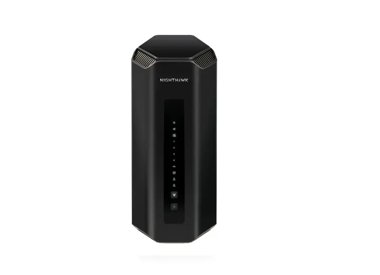
BE19000 WiFi Router (RS700S)
Nighthawk WiFi 7 Router RS700S, 19Gbps
- WiFi 7 technology
- 10G speeds
- up to 19 Gbps
- up to 3,500 sq. ft. (325 sq. meters)

BE18000 WiFi Router (RS600)
Nighthawk WiFi 7 Router RS600, 18Gbps
- WiFi 7 technology
- 10G speeds
- up to 18 Gbps
- up to 3,300 sq. ft.
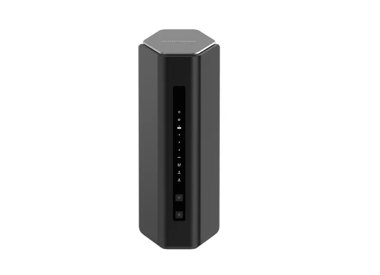
BE12000 WiFi Router (RS500)
Nighthawk WiFi 7 Router RS500, 12Gbps
- WiFi 7 technology
- 2.5G speeds
- up to 12 Gbps
- up to 3,000 sq. ft.

BE9300 WiFi Router (RS300)
Nighthawk WiFi 7 Router RS300, 9.3Gbps
- WiFi 7 technology
- 2.5G speeds
- up to 9.3 Gbps
- up to 2,500 sq. ft.

BE6500 WiFi Router (RS200)
Nighthawk WiFi 7 Router RS200, 6.5Gbps
- WiFi 7 technology
- 2.5G speeds
- up to 6.5 Gbps
- up to 2,500 sq. ft.

BE5000 WiFi Router (RS150)
Nighthawk WiFi 7 Router RS150, 5Gbps
- WiFi 7 technology
- 2.5G speeds
- up to 5 Gbps
- up to 2,250 sq. ft.

BE6500 WiFi Router (RS100)
Nighthawk WiFi 7 Router RS100, 3.6 Gbps
- WiFi 7 technology
- 2.5G speeds
- up to 3.6 Gbps
- up to 2,000 sq. ft.

AXE7800 WiFi Router (RAXE300)
Nighthawk~~®~~ Tri-Band WiFi 6E Router (up to 7.8Gbps) with new 6GHz band, NETGEAR Armor™ & NETGEAR Smart Parental Controls™
- WiFi 6E technology
- up to 7.8 Gbps

AX6000 WiFi Router (RAX120)
Nighthawk 12-Stream Dual-Band WiFi 6 Router (up to 6Gbps) with NETGEAR Armor, MU-MIMO, USB 3.0 ports
- WiFi 6 technology
- up to 6 Gbps

AX4200 WiFi Router (RAX43)
Nighthawk~~®~~ 5-Stream Dual-Band WiFi 6 Router (up to 4.15Gbps) with NETGEAR Armor~~™~~ & NETGEAR Smart Parental Controls~~™~~
- WiFi 6 technology
- up to 4.15 Gbps

AX3000 WiFi Router (RAX40v2)
NETGEAR Nighthawk AX3000 WiFi 6 Router (RAX40)
- WiFi 6 technology
- up to 3 Gbps

AX3000 WiFi Router (RAX36S)
Nighthawk AX4 4-Stream Dual-Band WiFi 6 Router, up to 3Gbps, with 1-year NETGEAR Armor included
- WiFi 6 technology
- up to 3 Gbps
Showing 1-12 of 18
FREQUENTLY ASKED QUESTIONS
A modem connects your home to the internet through your ISP. A router shares that internet connection with multiple devices, either through WiFi or Ethernet. In short, the modem handles the signal coming in from your provider. The router then manages how that signal is distributed across your home network. You need both for internet access on multiple devices.
Choose based on how you use the internet and how many devices you have. A single-band router is basic and best for light use in small spaces. Dual-band routers offer better performance by splitting traffic between two frequencies, which helps reduce congestion. Tri-band routers add a third band for even more capacity, making them a better choice for busy homes with many devices streaming, gaming, or working online at the same time.
You should replace your router every 3 to 5 years. Older routers may not support the latest WiFi standards or speeds, and performance can degrade over time. Upgrading ensures better coverage, improved security, and support for newer devices and applications. If your internet feels slow or inconsistent, it may be time for a new one.
A traditional router broadcasts WiFi from a single point, which works well for smaller homes or apartments. A mesh WiFi system uses multiple devices (called nodes or satellites) to create a network that covers your entire home more evenly. If you’ve got a larger space, thick walls, or WiFi dead zones, mesh systems offer stronger, more consistent coverage — no need to manually switch between networks as you move around.
Tip: Routers are ideal for centralized setups. For seamless, wall-to-wall WiFi, consider exploring Mesh WiFi systems.